понедельник, 28 апреля 2008 г.

How to enlarge the disk size of a VM drive?

For a client of ours we had to create a test in VMWARE but at a certain moment we noticed that the VM was running out of space, so we had to try to enlarge the disk size of the VM.

It is rather simple if you know it. In fact it is just an .exe file that you will have to run.

The steps:
Look in your VM for the VM that you want to enlarge.
Select it and double click on the disk that you want to enlarge.

Now you get the properties of this disk, remember the disk file and go to your explorer window and go to the directory of this VM, just to make sure that this file really exists.

If you are working on windows open a dos cmd(Start -> Run)
For the solution read more…

Now go to the VMWARE program directory in windows this is something like C:\Program Files\VMware\VMware Workstation
In this directory you will have to start the script that will enlarge the disk space of your VM-drive.

The command will look like: vmware-vdiskmanager.exe -x 19GB "F:\VMWare\Webcenter\test.vmdk" where 19GB will be the new size of your VM-drive.
You will see an indicator with the percentage of growth.

With this exe file it is also possible to shrink, create, defragment, rename, ... VM-disks

Invalid Embed directive in stylesheet

On a few occasions now, for no really apparent reason, suddenly our Problem Pane will be spammed with tons of messages all sort of looking like this:

Invalid Embed directive in stylesheet - can't resolve source 'Embed(source = "/assets/common.swf", symbol = "AccordionHeader_disabledOverSkin")'.

In the past, sometimes it would only happen on a mac, other times windows machines. I've tried deleting my bin folder, cleaning the project, recompiling the swf's, moving the swf's around, changing the syntax in the css ever so slightly. I've googled this on many occasions and found no clear answer. Today I decided that I needed to know what caused this and if in fact I figured it out, to share it with you.

What ended up being the root cause of our problem is that in several places in the application we were referencing image assets directly in our assets folder, i.e. /assets/delete.png, which is often the case when our designers aren't keeping up with asset creation and developers just throw some image up as a placeholder for the time being. Now it just so happened that ONE of these references was incorrect and its Embed pointed to a file that did not exist. I discovered this when I commented out our style css references in the application, and saw the error only then. It was this broken reference that caused the above error. I fixed the reference to point to the right file, did a Project clean, and all the Invalid Embed Directive errors went away.

I should note that we had over 100 references to symbols in our css, and by default Flexbuilder only shows the first 100 errors. Unluckily the "unable to resolve 'assets/deleted.png' for transcoding in ...." was error number 138 and did not show up in the list. I had to change my preferences to show all 138 errors.

So the lesson learned is that when you get spammed with this error, it could well be that only one Embed tag somewhere in your app is actually broken, and that your css and swf is probably just fine.

воскресенье, 27 апреля 2008 г.

How to enlarge the disk size of a VM drive?

For a client of ours we had to create a test in VMWARE but at a certain moment we noticed that the VM was running out of space, so we had to try to enlarge the disk size of the VM.

It is rather simple if you know it. In fact it is just an .exe file that you will have to run.

The steps:
Look in your VM for the VM that you want to enlarge.
Select it and double click on the disk that you want to enlarge.

Now you get the properties of this disk, remember the disk file and go to your explorer window and go to the directory of this VM, just to make sure that this file really exists.

If you are working on windows open a dos cmd(Start -> Run)
For the solution read more…

Now go to the VMWARE program directory in windows this is something like C:\Program Files\VMware\VMware Workstation
In this directory you will have to start the script that will enlarge the disk space of your VM-drive.

The command will look like: vmware-vdiskmanager.exe -x 19GB "F:\VMWare\Webcenter\test.vmdk" where 19GB will be the new size of your VM-drive.
You will see an indicator with the percentage of growth.

With this exe file it is also possible to shrink, create, defragment, rename, ... VM-disks

четверг, 24 апреля 2008 г.

Invalid Embed directive in stylesheet

On a few occasions now, for no really apparent reason, suddenly our Problem Pane will be spammed with tons of messages all sort of looking like this:

Invalid Embed directive in stylesheet - can't resolve source 'Embed(source = "/assets/common.swf", symbol = "AccordionHeader_disabledOverSkin")'.

In the past, sometimes it would only happen on a mac, other times windows machines. I've tried deleting my bin folder, cleaning the project, recompiling the swf's, moving the swf's around, changing the syntax in the css ever so slightly. I've googled this on many occasions and found no clear answer. Today I decided that I needed to know what caused this and if in fact I figured it out, to share it with you.

What ended up being the root cause of our problem is that in several places in the application we were referencing image assets directly in our assets folder, i.e. /assets/delete.png, which is often the case when our designers aren't keeping up with asset creation and developers just throw some image up as a placeholder for the time being. Now it just so happened that ONE of these references was incorrect and its Embed pointed to a file that did not exist. I discovered this when I commented out our style css references in the application, and saw the error only then. It was this broken reference that caused the above error. I fixed the reference to point to the right file, did a Project clean, and all the Invalid Embed Directive errors went away.

I should note that we had over 100 references to symbols in our css, and by default Flexbuilder only shows the first 100 errors. Unluckily the "unable to resolve 'assets/deleted.png' for transcoding in ...." was error number 138 and did not show up in the list. I had to change my preferences to show all 138 errors.

So the lesson learned is that when you get spammed with this error, it could well be that only one Embed tag somewhere in your app is actually broken, and that your css and swf is probably just fine.

среда, 23 апреля 2008 г.

APEX versus ADF

When talking about User Interfaces, Rapid Application Development (RAD), AJAX-like features such as Drag-and-Drop functionality a lot of frameworks pop up.

When you're looking at Frameworks and tooling and vendor-specific solutions you could think of APEX, Application Development Framework (ADF), ADF Rich Client Components, Trinidad, ...

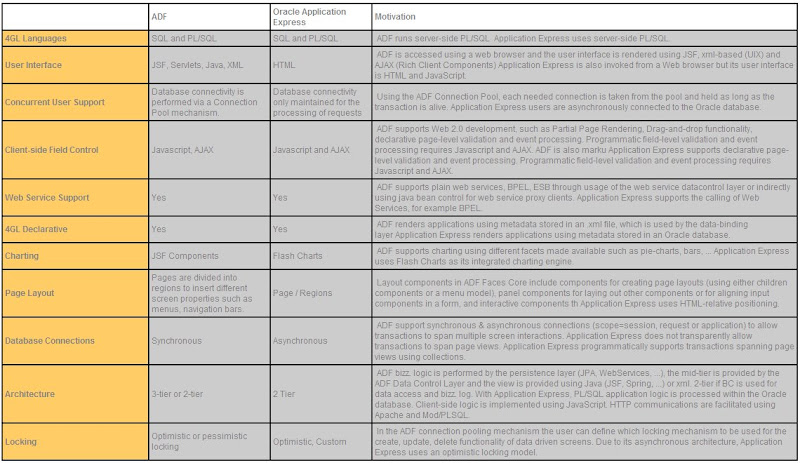
To be able to compare these products, we've tried to build a matrix of features and how these features are managed in APEX and ADF.

We're talking about 10.1.3 features, not yet about 11g because these aren't production ready yet. 11g is very promissing about web 2.0 functionality and more service oriented approach, but for now let's stick to what we have.

Feel free to comment, add features, add comparisons ...

понедельник, 21 апреля 2008 г.

Invalid Embed directive in stylesheet

On a few occasions now, for no really apparent reason, suddenly our Problem Pane will be spammed with tons of messages all sort of looking like this:

Invalid Embed directive in stylesheet - can't resolve source 'Embed(source = "/assets/common.swf", symbol = "AccordionHeader_disabledOverSkin")'.

In the past, sometimes it would only happen on a mac, other times windows machines. I've tried deleting my bin folder, cleaning the project, recompiling the swf's, moving the swf's around, changing the syntax in the css ever so slightly. I've googled this on many occasions and found no clear answer. Today I decided that I needed to know what caused this and if in fact I figured it out, to share it with you.

What ended up being the root cause of our problem is that in several places in the application we were referencing image assets directly in our assets folder, i.e. /assets/delete.png, which is often the case when our designers aren't keeping up with asset creation and developers just throw some image up as a placeholder for the time being. Now it just so happened that ONE of these references was incorrect and its Embed pointed to a file that did not exist. I discovered this when I commented out our style css references in the application, and saw the error only then. It was this broken reference that caused the above error. I fixed the reference to point to the right file, did a Project clean, and all the Invalid Embed Directive errors went away.

I should note that we had over 100 references to symbols in our css, and by default Flexbuilder only shows the first 100 errors. Unluckily the "unable to resolve 'assets/deleted.png' for transcoding in ...." was error number 138 and did not show up in the list. I had to change my preferences to show all 138 errors.

So the lesson learned is that when you get spammed with this error, it could well be that only one Embed tag somewhere in your app is actually broken, and that your css and swf is probably just fine.

воскресенье, 20 апреля 2008 г.

APEX versus ADF

When talking about User Interfaces, Rapid Application Development (RAD), AJAX-like features such as Drag-and-Drop functionality a lot of frameworks pop up.

When you're looking at Frameworks and tooling and vendor-specific solutions you could think of APEX, Application Development Framework (ADF), ADF Rich Client Components, Trinidad, ...

To be able to compare these products, we've tried to build a matrix of features and how these features are managed in APEX and ADF.

We're talking about 10.1.3 features, not yet about 11g because these aren't production ready yet. 11g is very promissing about web 2.0 functionality and more service oriented approach, but for now let's stick to what we have.

Feel free to comment, add features, add comparisons ...